
Documentation
Trackself docs
Setup guides for the desktop app, portal workflows, privacy, timesheets, reporting, and account access.
Start here
Start with sync, access, and privacy
If you are new to Trackself, read the sync and privacy guides first. They explain how the desktop app protects task content, how the portal unlocks it for review, and what setup decisions matter early.
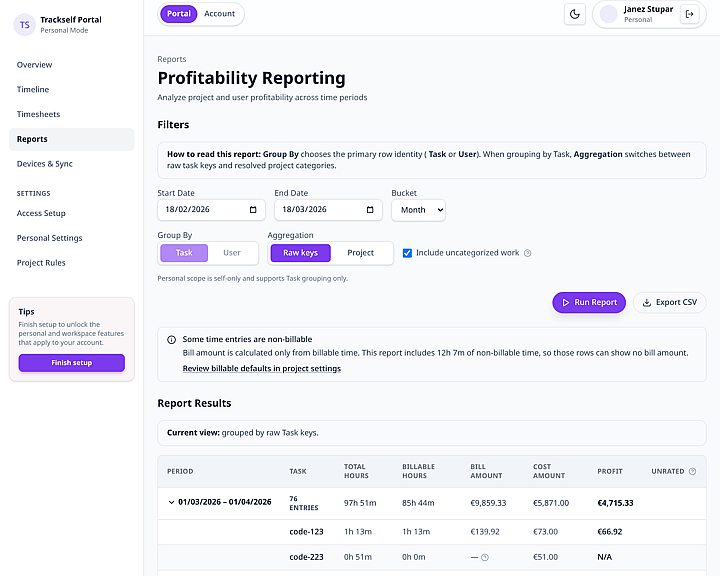
Portal visibility, reporting, and review stay compatible with encrypted task content.
Portal review, timesheets, and reporting in one place
Desktop App
Setup, daily tracking, sync options, Jira, and account basics.
- Getting startedInstall Trackself, finish onboarding, and start your first timer from the desktop app.
- Time trackingUse quick entry, @ categorization, autocomplete, editing, and billable controls in the desktop tracker.
- System trayKeep Trackself running in the tray or menu bar so tracking stays within reach while the main window is hidden.
- Sync and data protectionCompare shared-folder sync and cloud sync, then understand how Trackself protects sensitive task content on the desktop path.
- Existing personal access and new setupUnderstand the warning shown when a device finds an existing Personal Access and you try to create a new one.
- Key rotationChange access safely without accidentally creating a separate Personal Access key version.
- Jira integrationConnect Jira Cloud, choose the sites and projects you care about, and send worklogs from tracked entries.
- Profile and licensingCheck license state, account status, and the account actions available from the desktop app.
- ExportExport your tracked entries to CSV for spreadsheets, invoicing, or your own reporting flow.
User Portal
Onboarding, timeline review, timesheets, reporting, and access control.
- Getting startedSign in, finish onboarding, and set up personal or workspace access in the portal.
- Overview dashboardUse the dashboard as your landing page for current work, setup blockers, workspace signals, and quick links into timeline or reports.
- TimelineReview personal and workspace entries by day, week, or month, then move straight into timesheet preparation.
- TimesheetsPrepare, submit, review, lock, and share immutable timesheet snapshots from the portal.
- ReportsRun personal or workspace reports, export results, and spot missing rate coverage before it distorts billing.
- Access setupUnlock protected content, trust the current browser, and manage personal or team access methods.
- Security and privacy modelSee how the portal unlocks protected entries in the browser while keeping sensitive task content off the server.
- Personal settingsConfigure your own timezone and default currency without changing workspace-wide defaults.
- Workspace settingsConfigure workspace timezone and default currency, with read-only access for non-admin roles.
- Devices and syncReview connected desktop devices and their sync health from the portal.
- Project rulesCreate personal or workspace project rules that classify entries and drive profitability calculations.
- Team workspacesManage workspace members, invitations, role changes, and removals from the team roster.
- Roles and permissionsUse the full role reference for workspace access, approvals, reporting, settings, and delegation limits.
Getting started
Core paths
Use these guides to get the desktop app installed, syncing, and ready for portal workflows.


Featured article
Portal access setup
Learn how to unlock protected content, trust the current browser, and manage personal or team access without losing the privacy model.