
Use a desktop app instead of burying time tracking beside email, chat, and every other browser workflow.
Privacy-first team time tracking
Time tracking for work you cannot spill.
Track time and review work without turning client names, matter details, or project scopes into vendor-readable records.
Cloud infrastructure stores encrypted records, not readable task titles, descriptions, or categories.
Start with a 14-day cloud trial, keep work local, or plan on-premises when that is the better fit.
The problem with ordinary time tracking
Time entries can give too much away.
Task names can reveal legal strategy, patient-adjacent work, restricted project names, or acquisition timelines.
What generic SaaS exposes
- Vendor-visible client and project context
- More procurement friction around access and data handling
- A weaker answer to "who can read our work logs?"
What Trackself protects
- Task content protected before sync
- Team workflows without readable task details in the cloud
- Deployment choices from cloud sync to on-premises
What buyers actually need
Private has to stay practical.
Keep the workflow your team needs without exposing the work behind it.
No vendor-readable tasks
Task titles, descriptions, and categories are protected before sync, so the cloud service does not need readable work details to operate.
Still useful for teams
Managers still get shared visibility, reporting, and timesheets without sending everyone back to isolated local tools.
A clearer security answer
When buyers ask who can read work logs, Trackself gives a cleaner answer than a SaaS tracker storing everything in plaintext.
Control can grow with you
Start with cloud sync, stay local, or plan on-premises instead of accepting one fixed deployment model.
What the product actually looks like
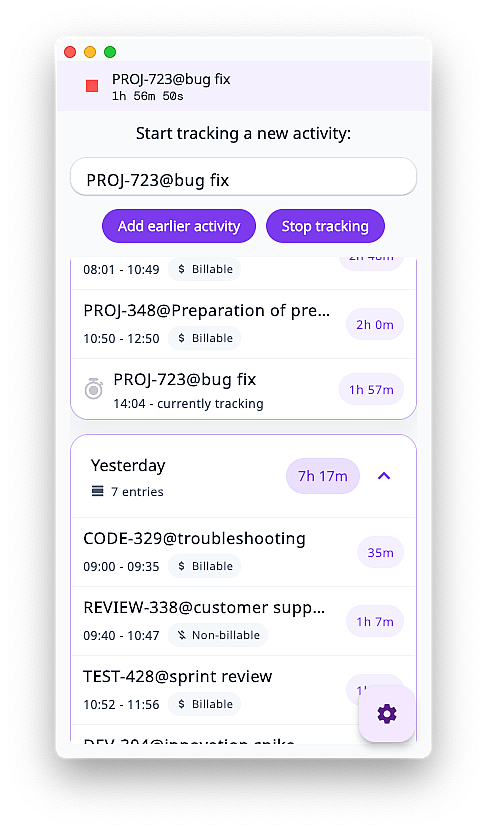
Desktop for capture. Portal for review.
The desktop app stays close to the work. The portal handles shared reporting, timesheets, and approval.
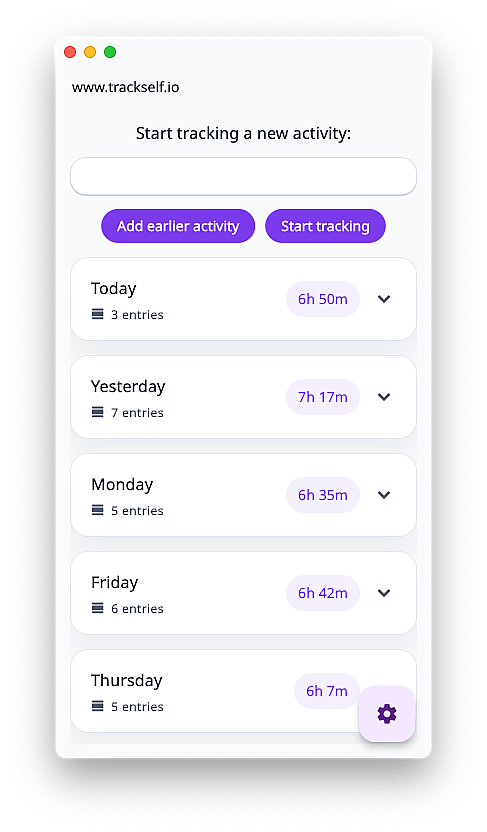
The desktop app stays lightweight even before a timer is running.
Capture without browser drift
Track time in the desktop app where the work is happening, so capture stays fast instead of becoming another tab or form.
- Start and stop active work without turning capture into a browser workflow
- Keep recent entries and category history visible while you work
- Protect the task content that would usually sit in a vendor-readable tracker
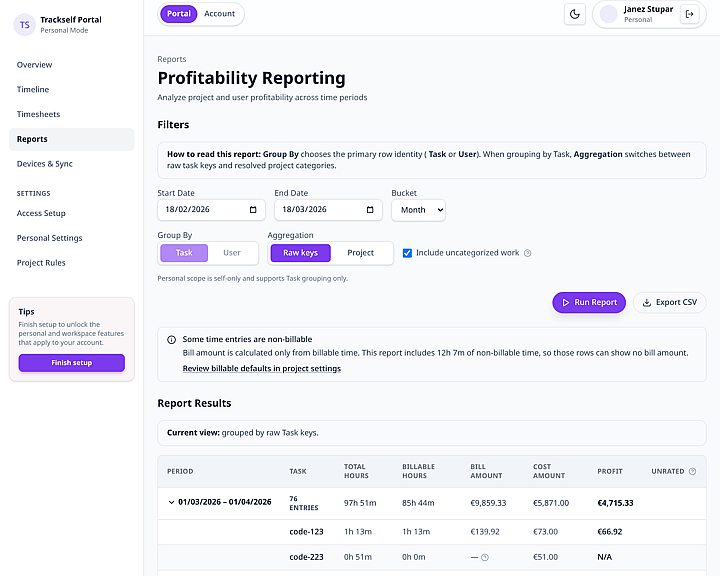
Portal visibility, reporting, and review stay compatible with encrypted task content.
Review without plaintext logs
Use the portal for reports, timelines, and timesheets without falling back to ordinary readable work logs.
- Review timelines, reports, and submitted timesheets in one place
- Give managers and teams a shared operational view
- Keep privacy constraints compatible with day-to-day reporting and approval
Choose your rollout path
Start simple. Keep control.
Use cloud when you need timesheets, reporting, portal workflows, and Jira. Stay local or move on-premises when control matters more.
Most teams start with cloud plans for timesheets and reporting.
Local storage
$0/yearFor personal use, simple evaluation, or teams keeping sync inside storage they control.
Use locallyCloud sync
14 days freeFor teams that need timesheets, reports, portal access, and Jira without running infrastructure.
Try TrackselfOn-premises
Custom quoteFor organizations whose procurement, infrastructure, or regulatory rules require their own systems.
Talk deploymentThe time entry is often the leak.
Before anyone opens a file or attachment, a work log can already reveal the client, matter, project, or internal initiative.
Legal and advisory teams
Matter names, deal timelines, and litigation strategy can leak through ordinary time entries before any formal document is shared.
Restricted projects
Project names, scopes, and contractor activity can become sensitive the moment they land in daily work logs.
Regulated operations
Patient-adjacent work, compliance reviews, and internal controls can all surface through routine task labels.
What a time entry can reveal
- Client or matter names
- Project scope or internal initiative
- Compliance or review activity
- Billing context or work type
In privacy-sensitive teams, this context often matters before any attachment, ticket, or source document is ever opened.
If records are exposed by any means, protected task content is far less useful to an attacker or outside party than an ordinary plaintext work log.
Why Trackself is a different category
Not ordinary SaaS. Not local-only.
Cloud trackers make work logs readable to the vendor. Local-only tools rarely cover shared review and reporting.
Comparison pointTrackselfNormal cloud trackerLocal-only tracker
Vendor-readable task contentNoYesNo
Team review and reportingYesYesLimited
Deployment optionsFree, cloud, on-premisesCloud onlyLocal only
Ready to evaluate
Choose your first step.
Start with cloud for portal workflows, or go straight to enterprise when procurement points on-premises.